Everyone wants the magic prompt: “You are a Product Development expert. Apply AI/GenAI to our Product Development Lifecycle (PDLC) to gain efficiencies, reduce churn, and make our team more effective.”
If only improving your product development capabilities were as easy as a specifically-worded LLM prompt. While AI shows transformational promise, it can’t magically take over your product development. The real challenge isn’t whether to use AI in product development, but how to apply it to your specific PDLC in the best way (or maybe at least not in the worst way.)
Building software products is, by definition, full of uncertainty. In a previous article, I noted that organizations use systems to measure uncertainty, such as the Cynefin framework. I place software development in the framework’s Complex quadrant. Here, there’s no clear cause-and-effect relationship, and “unknown unknowns” predominate. Here, best practices can’t be defined upfront. Instead, you must probe (experiment), sense (observe what happens), and respond (adapt based on what you learn). Effective practices emerge over time, but they can’t be predicted.
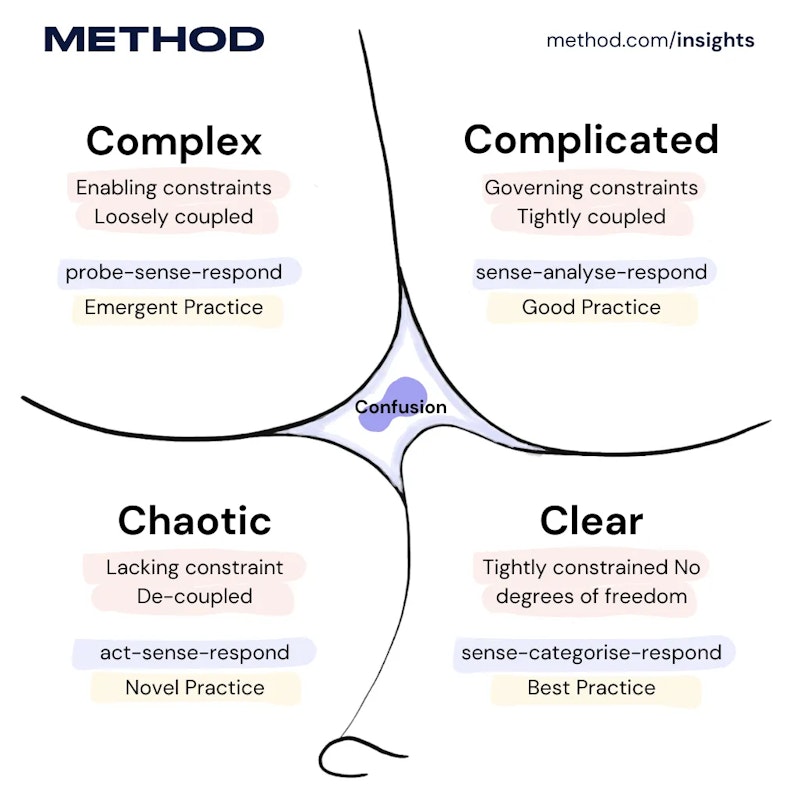
The Cynefin framework divides problems into five domains based on the relationship between cause and effect. On the right side are the “ordered” domains: Clear (obvious cause-and-effect; use best practices) and Complicated (analyzable cause-and-effect; requires expertise). On the left are “unordered” domains: Complex (cause-effect is clear only in hindsight; requires experimentation) and Chaotic (no clear cause-effect; requires immediate action to stabilize). The center represents Confusion: when you don’t yet know which domain you’re in.
The Cynefin framing isn’t just academic; it explains why product work rarely follows a neat, repeatable recipe. Your PDLC is the mechanism your team uses to navigate that uncertainty from idea to production. And it’s exactly where AI can either amplify learning or amplify noise.
In this article, “PDLC” refers to your team’s process for taking any idea (whether it’s a new product, feature, or improvement) from concept to production. This is the workflow that repeats every sprint or cycle: validate, prioritize, design, prototype, build, test, deploy. When teams struggle with speed, quality, or churn, it’s usually this workflow that needs reinforcing, which is why we focus on building Modern Product capabilities at Method: the processes, tools, and team structures that move ideas to implementation effectively. Our operating model includes these phases:

With AI, we’re introducing a non-deterministic set of tools (agents, copilots etc.) into a complex ecosystem where you only know if something works after you try it. In other words, we’re dousing our uncertainty with more unpredictability. Doesn’t sound encouraging, does it?
But this isn’t a new problem for software teams. Building software has always meant operating under uncertainty, and we already have a reliable way to navigate it: start small, experiment, measure outcomes, adjust, keep working in small batches, and scale what works. It turns out that this approach handles non-determinism well, too. So rather than searching for the “perfect” AI rollout, we should do what we do whenever we need to learn: run experiments.
Below are 2-3 experiments for each PDLC stage you can run today to improve your specific workflow. AI will make you better if you use it correctly for your software development in your context.
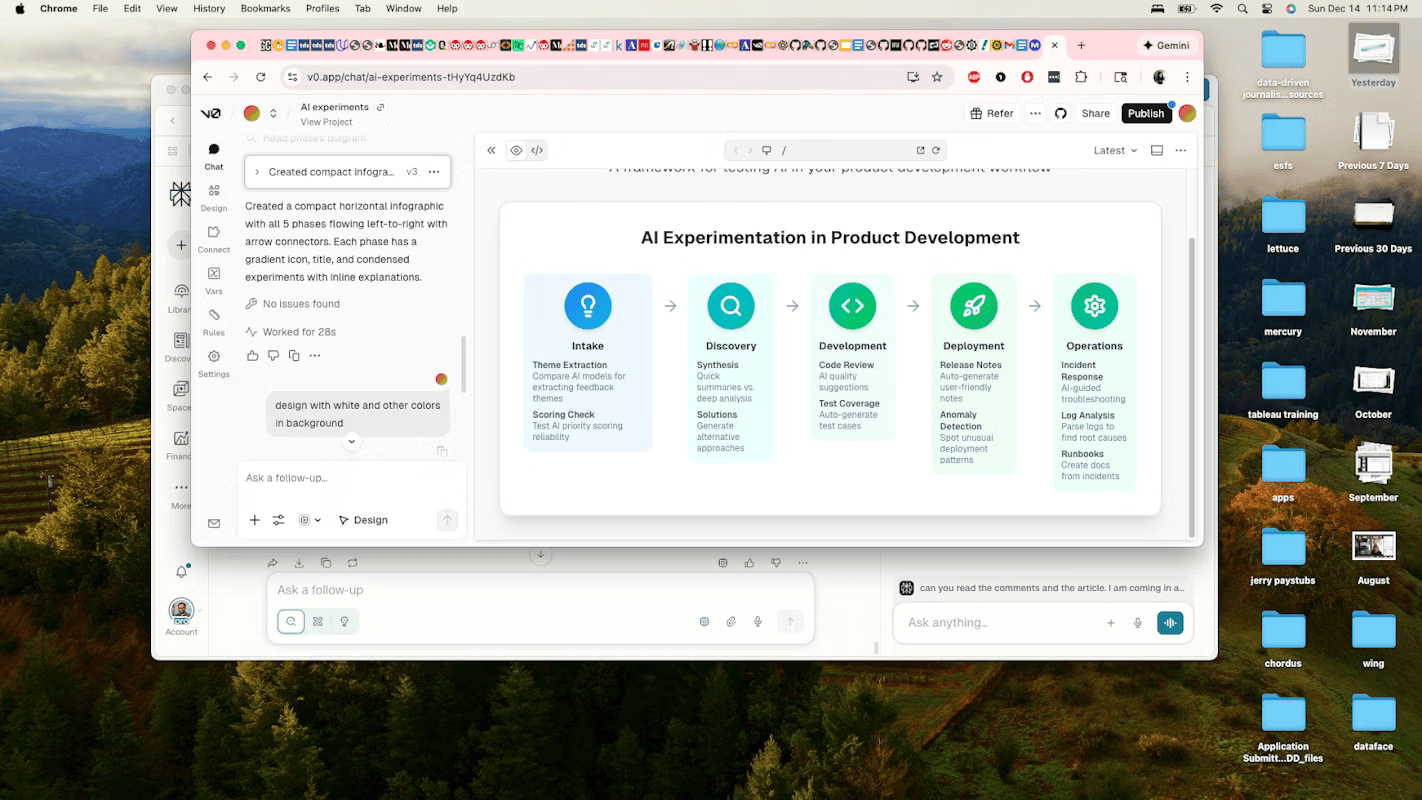
Phase 1: Intake & Prioritization
This phase determines whether incoming ideas are signal or noise, and which signals deserve attention first. AI promises to make sense of messy feedback and remove bias from prioritization. Let’s run these experiments below to find out if it really does
Experiment 1: Theme Extraction Shootout Goal: Learn if AI finds patterns in your feedback that humans miss (or creates false patterns)
Setup (2 hours):
- Export last month’s feedback (aim for 50-100 items from support tickets, sales calls, user interviews)
- Divide your team into two groups. Group A manually identifies and categorizes themes. Group B uses Claude or GPT-4 with this prompt: “Read these customer feedback items and identify 5-8 recurring themes. For each theme, list which feedback items belong to it and a representative quote.”
Compare:
- Did AI find themes humans missed?
- Did AI create fake themes by connecting unrelated items?
- How much time difference? Was the AI quicker?
- Which themes led to more interesting product discussions?
What you learn: Whether AI helps with signal detection in your specific feedback format. Blog posts might cluster well, but Slack messages might not. Your data determines AI’s value.
Experiment 2: Scoring Consistency Check Goal: Discover if AI makes prioritization more consistent or just differently biased
Setup (1 hour):
- Take 20 feature requests from your backlog
- Define your scoring criteria (strategic fit, customer impact or effort – whatever you actually use)
- Have 3 people independently score all 20 requests
- Prompt an LLM: “Score these requests on: [your criteria]. Use 1-10 scale. For each request, explain your scoring.”
Compare:
- Calculate variance between humans and between AI runs
- Where did humans wildly disagree? Did AI have an opinion?
- Where was AI overly confident? Overly safe?
- Did AI reveal implicit biases in your criteria (e.g., always favoring certain customer segments)?
What you learn: Whether AI adds consistency or just automates your team’s existing biases. Sometimes AI’s “wrong” scores surface broken assumptions in your criteria.
Phase 2: Product Discovery & Strategy
Experiment 1: Synthesis Speed vs. Depth Trade-off Goal: Learn if AI synthesis saves time but loses critical nuance
Setup (3 hours):
- Take 5-8 user interview transcripts from a recent research round
- Researcher A: Manually synthesize findings (your normal process)
- Researcher B: Use AI to generate initial synthesis, then review/edit
- Prompt: “Analyze these interview transcripts. Identify: key pain points, unexpected insights, areas of disagreement between participants, and quotes that capture important context.”
Compare:
- What was the time investment for each approach?
- What insights did manual analysis catch that AI missed?
- What patterns did AI surface that humans missed initially?
- Did AI flatten disagreements into false consensus?
- How much editing time did researcher B need to fix AI’s synthesis?
What you learn: Whether AI gives you back time is worth the risk of missing subtle signals. Junior researchers may achieve 80% of the senior’s quality. Senior researchers might find AI adds noise, not signal.
Experiment 2: Solution Space Exploration Goal: Test if AI generates useful alternatives or just obvious/impractical ideas
Setup (1 hour):
- Take a real problem statement you’re working on
- Team brainstorm: 15 minutes to generate solution approaches
- AI brainstorm: “Given this problem: [statement] and these constraints: [list], generate 10 different solution approaches. Include conventional and unconventional options.”
Compare:
- What is the overlap between human and AI ideas?
- Which AI ideas made you think differently?
- Which AI ideas were technically impossible or missed the point?
- Did AI inspire new human ideas during review?
What you learn: Whether AI is a useful thinking partner for your team or just generates noise. If every AI suggestion is either obvious or nonsense, skip it. If 2-3 ideas per session spark better thinking, that may be useful.
Phase 3: Development
Experiment 1: Code Review Enhancement vs. Distraction Goal: Learn if AI code review catches real issues or creates alert fatigue
Setup (1 week):
- Run AI-powered code review on all PRs for a week (GitHub Copilot, SonarQube AI, etc.)
- Track: AI-flagged issues that were real problems, false positives ignored, time spent reviewing AI suggestions
- Compare against: issues found in QA, production bugs that week
Compare:
- Did AI catch bugs humans missed in code review?
- How many AI flags were false positives?
- Did it catch different types of issues than human reviewers?
- Did reviewing AI suggestions slow down or speed up PR approval?
What you learn: If AI review complements human review or just adds noise. Also reveals if your existing code review is thorough enough – if AI catches nothing, either it’s useless or your review is already excellent.
Experiment 2: Test Coverage Experiment Goal: See if AI-generated tests actually test the right things
Setup (2 hours):
- Pick 3 functions: one simple, one moderately complex, one with tricky edge cases
- Dev A: Write tests manually
- Dev B: Have AI generate tests, then review
- Intentionally break each function in 3 ways (off-by-one error or null handling or boundary condition)
Compare:
- Which test suites caught which bugs?
- Did AI tests focus on implementation details vs. behavior?
- How much time did B spend fixing AI’s tests?
- Did AI think of edge cases A didn’t test?
What you learn: Whether AI tests give false confidence (tests pass but don’t test what matters) or actually improve coverage. Also shows if your team knows what makes a good test.
Phase 4: Deployment
Experiment 1: Release Notes Usefulness Test Goal: See if AI-generated release notes communicate value to users
Setup (3 releases):
- AI generates release notes from commits/PRs
- Human edits to add context, fix tone, and customer perspective
- Track editing time and what categories of edits (accuracy, tone, missing “why”)
Compare:
- How much was wrong/misleading in the AI version?
- What critical context did AI miss?
- Did AI help with the boring parts (formatting, organizing)?
- Would you ship an AI version without editing? (honest answer)
What you learn: If AI gives you a useful starting point or creates editing work that takes as long as writing from scratch. Also reveals whether your commit messages are sufficient for AI to work with.
Experiment 2: Deployment Anomaly Detection Tuning Goal: Find if AI anomaly detection catches real issues or cries wolf
Setup (2 weeks):
- Enable AI anomaly detection during deployments
- Track: alerts triggered, false alarms vs. real issues, time to investigate
- Compare against: issues found by traditional monitoring, user reports
Compare:
- What percentage were true positives (issues AI detected that would otherwise have been missed)?
- What percentage were false positives (alerts that required investigation but revealed no actual issues)?
- What percentage were false negatives (real issues AI missed but traditional monitoring caught)?
- How much time was required to tune AI to an acceptable false positive rate?
What you learn: Whether AI monitoring adds a safety net or just alert fatigue. Also shows whether your baseline monitoring is already sufficient.
Phase 5: Operations
Experiment 1: Incident Response Assistant Reality Check Goal: Test if AI suggestions help during actual incidents or distract
Setup (use during next 5 incidents):
- When an incident starts, ask AI: “Given these symptoms [paste logs/alerts], what are the three most likely root causes and how would you investigate each?”
- On-call engineer follows their instincts AND reviews AI suggestion
- After resolution, compare the actual root cause to AI’s suggestions
Compare:
- Was the actual cause in AI’s top 3? Top 5?
- Did AI’s suggestion point toward the right investigation path?
- Did AI waste time with irrelevant suggestions?
- Would AI have helped a junior engineer more than a senior?
What you learn: If AI accelerates diagnosis or adds cognitive load during high-stress situations. Also reveals if your alerts provide enough context for AI to be useful.
Experiment 2: Log Analysis Speed vs. Accuracy Goal: See if AI finds patterns in logs faster without missing critical details
Setup (1 hour):
- Pick a past incident with messy logs
- Engineer A: Manual analysis (time how long to find root cause)
- Engineer B: Use AI to analyze the same logs, then verify findings
- Prompt: “Analyze these logs from [time period]. Identify: error patterns, anomalies, potential root causes, and the sequence of events leading to failure.”
Compare:
- How long did each approach take to identify the root cause?
- What false leads did AI generate, and how much time was spent pursuing them?
- What patterns did AI surface that manual review missed?
- How much time was required to verify AI’s findings?
What you learn: If AI helps with the haystack problem or just generates more hay. Also shows if your logs are structured enough for AI to parse meaningfully.
Experiment 3: Runbook Generation from Tribal Knowledge Goal: Test if AI can capture institutional knowledge before people leave
Setup (2 hours):
- Pick a recurring incident that the senior engineer “just knows” how to fix
- Interview the senior engineer about how they troubleshoot it
- Have AI generate a runbook from the interview + past incident tickets
- Have the junior engineer test the runbook on the next occurrence
Compare:
- Could junior engineers follow the AI runbook successfully?
- What critical steps did AI miss or get wrong?
- What implicit knowledge didn’t transfer?
- How much editing did senior engineers need to do?
What you learn: If AI helps capture and transfer operational knowledge or if “you had to be there” matters too much. Also reveals gaps in your incident documentation.
Conclusion
There’s no debating the impact AI is already having, and will continue to have on the product development lifecycle. The real question is: How will it help your team, in your context? How can you be confident you’ll get value today without painting yourself into a corner tomorrow?
The only real answer is: experiment and find out. The experiments here block out all the hype-fueled noise and allow you to prove the benefits (and trade-offs) of AI for your context. And these aren’t the only ones you should run; use them as a starting point, then design additional experiments around what matters most to your team.
And, of course, if you need help setting up your “AI Lab” environment or building an experimentation cadence, Method can help.